AVA Virtual Witness Photos
Overview
sole product designer
pm, 2 BE engineers, 3 FE engineers
web
February 2022 - Present (development still in progress)
Role
Team
Platforms
Dates
Background
Metromile is a full-fledged car insurance company, with a large team of internal claims adjusters. When a member gets into an accident, to receive financial compensation, they need to file a claim with Metromile. Users can either file a claim online or over the phone. The claim includes details of the accident, e.g. where and when it happened, who was involved, etc., along with photos of the accident (if possible) and damage to the vehicle.
Next, claims adjusters review all the information members submit and investigate where necessary before approving or denying payouts. This team has five different departments to handle different types of claims, e.g. the file owner group is the first line of defense and often settles straightforward claims, while the special investigation unit is the team that investigates claims where there is a suspicion of fraud.
While all adjuster teams rely on third-party tooling to review their claims, Metromile also has an internal tool, AVA Virtual Witness (AVW), used for telematics data, e.g. GPS position and movement data, and photos. Photos are especially important to all types of claims adjusters, because, unlike more traditional car insurance companies, Metromile does not send their adjusters to see the damage in person. Metromile adjusters rely heavily on photos to evaluate the damage to the vehicle.
For the past couple of years, Metromile’s focus was on growth. Like many internal tools in this type of situation, the team was just trying to keep the lights on with AVW. When it was announced Lemonade was acquiring Metromile, priorities shifted away from growth and toward retention. Because adjuster productivity and their ability to accurately settle claims are central to Metromile’s financials and a good claims experience is critical to retaining customers, a new team was spun up to redesign and rebuild AVW.
Understanding the problem
Cross-functional collaboration
This was my first time designing for adjusters. Claims processes are incredibly complex, and I knew I would have to lean heavily on our adjuster partners if I was going to successfully design for them. To do this, I had to build strong relationships with our adjuster teams. Adjusters are the experts in their workflows, pain points, needs, etc. I wanted them to be empowered to give feedback. This meant making sure their concerns were heard and responded to. After several years of letting their tools languish, I knew I’d need to work twice as hard to show them we cared and were going to take action on their needs. I reached out to claims team leaders to figure out who would be the best adjuster partners for the AVW project. The goal was an open and continuous conversation.
To improve the AVW tool, I first had to understand the claims process better, so I set up virtual ride-alongs with our claims adjusters. During these ride-alongs, my pm, Mike, and I learned that the photos section was the area where adjusters were feeling the most acute pain. While there were other areas of AVW that needed some love, they were doing their job pretty well. As I mentioned earlier, photo functionality is central to determining the facts of loss; adjusters use photos to understand the damage to a vehicle, whether there was any pre-existing damage, and if the damage is consistent with the details of the accident and any resulting injuries. The functionalities missing from the tool were key to successfully investigating claims.
The problems with the status quo
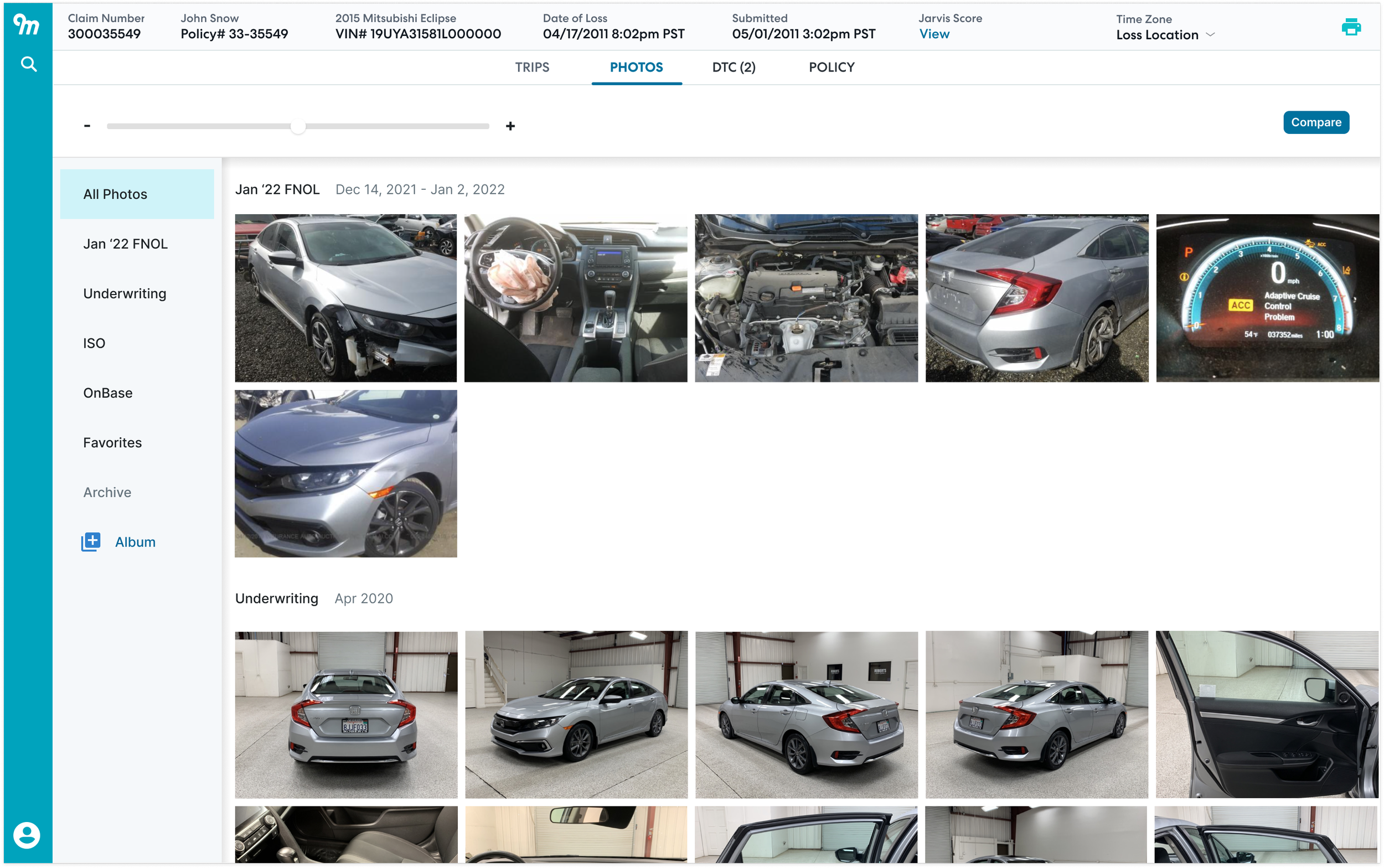
Screenshot of the legacy AVW photos experience. Around three quarters of the time, there are no UW photos, (i.e. underwriting photos or the photos we sometimes ask for from users when they first sign up for Metromile car insurance.)
From the adjusters, I learned that several shortcomings with the photo tooling inhibited productivity, made it difficult to do effective analysis, and lead to adjuster burnout:
Using our research findings, Mike, the pm, and I created a high level roadmap of features.
Depending on their function, adjusters touch between 25 and 80 claims in a week. This volume made keeping details about photos in their head nearly impossible. Additionally, when handing claims off between adjusters, without annotation, adjusters needed to spend valuable time bringing the new adjuster on the case up to speed. Within AVW, there was no ability to annotate photos to highlight damage and keep track of the photo content made keeping track of work difficult.
Photos were uploaded and stored in different places across multiple platforms. Having a central database of photos makes the investigation process much easier. Prior to this project, I was naive to the myriad photo types adjusters deploy. In the Metromile process, these photos were scattered across many tools. Photos of the damaged vehicle (i.e. first notice of loss or FNOL photos,) and sometimes the photos users take of their vehicle when they first sign up for Metromile insurance, (i.e. underwriting photos,) are in AVW, some are in OnBase, their file management system, others are obtained from business or government cameras and live on adjuster computers, and still, others are sourced from third-party services, e.g. photo sharing between insurance companies, a service that drives through neighborhoods photographing cars (a bit creepy, I know), etc. There was no automatic upload of photos from disparate locations into AVW and adjusters couldn’t even manually add new photos into AVW.
There was no functionality allowing flexible photo comparison. Having all of the photos related to a claim is also important because comparing photos is central to the investigation process. Adjusters look at older photos of the vehicle to see whether the damage was preexisting. They also look at the damage on the vehicle compared to the vehicle or object that was hit to see if the damage is consistent. AVW automatically compared FNOL photos and underwriting photos (on the rare occasion where we had them and successfully surfaced them in AVW.)
Lastly, there were a lot of bugs in AVW. Photos often have metadata that provides information critical to a claims investigation. From metadata, an adjuster can confirm that a photo was taken in a location close to the user’s or can even see if a photo was taken from the internet. AVW never loaded photo metadata. Additionally, the zoom and rotate functionalities simply didn’t work.
All of these problems lead adjusters to find solutions outside of AVW, slowing them down and causing frustration.
Our goals
Our overall goal was to improve efficiency and reduce frustration in the adjuster photo workflow. After taking a look at the metrics, we set our goals as:
Changing the claim open to close ratio from 1:.98 to 1:1.25. By closing more claims than you are opening, the company has a good signal that customer claims are getting resolved quickly and adjusters are efficient in their work.
Improving the Claims Quality Index (CQI) (which is measured on a zero to one scale) from .78 to .85. This metric is an assessment of the claims leakage, i.e. the amount of additional money Metromile is accidentally paying out.
Lastly, we were shooting to shift our Lost Adjustment Expense (LAE) combined ratio from 130% to 120%. The LAE combined ratio is a measurement looking at the amount of money Metromile pays out in claims, loss adjuster, and underwriting costs over the amount of money received in premium. Ultimately, we want our LAE combined ratio to be below 100%, but until Metromile was operating at a larger scale, we were just shooting to lower our LAE combined ratio.
Envisioning the solution
Modifying the Goal-Directed Design framework
When tackling larger projects, I often use pieces of Cooper’s Goal-Directed Design framework. One of the tools I like the most is scenarios. They help me imagine the ideal user experience, without getting into UX solutioning. Later on, they’re great inspiration for sketching. I also find they provide an enduring northstar for the product and design vision–if we know the experience we’re working toward, the steps we need to take to get there become much clearer.
Asking some questions in the avw-working-group slack channel
Conventionally, Goal-Directed Design would have you create personas before delving into scenarios, but, like many smaller teams, we didn’t have the time nor the resources to do a full persona creation process. Additionally, we have the benefit of having internal users already divided into groups–the five departments of the claims team. I decided to design for extremes. The file owner group deals with the most straightforward claims and the special investigations unit (SIU) team handles the most complex cases involving fraud or very high payouts. Using my notes from my ride-alongs, I wrote out first draft scenarios.
To keep the conversation going after the ride-alongs, I also set up a slack working group where I could keep the team in the loop about current designs and they could give feedback. I posted my first draft scenarios there with my open questions.
One thing I quickly learned is that, aside from adjusters in managerial positions, most of the team was not spending much of their day in slack. While I got some responses in the slack group, I started putting 15-minute zoom meetings on people’s calendars instead and used the slack channel as more of a way to share information, not get it. This had the unexpected benefit of creating much stronger relationships. Through a combo of slack messages and zoom talks, I refined the scenarios:
For the special investigations unit:
Sam is notified he has a new claim to review by Caylin. Caylin flagged it for SIU investigation because he found that damage the insured claimed was caused by the accident was present in photos that predate the accident. The insured had also recently updated their coverage. When he opens up the claim in AVW and looks at the photos section, he sees there’s an album with photos relevant to this claim. He knows the photos at the top are the most recent, so starts with those. When he opens each photo to look at them, he can see the notes left by Caylin and when those notes were made. Caylin is even able to comment on a specific part of a photo, so it’s very easy for Sam to see what Caylin is referring to. Sam compares the damage in the UW and FNOL photos. Looking at the metadata, he confirms when each photo was taken and agrees with Caylin’s assessment that some of the damage on the car predates the accident. Sam then replies to Caylin’s comments saying he agrees with his assessment. Sam then continues his investigation by reviewing to see if there are additional photos from other sources that show there’s damage to the area in question. Looking at all photos, he easily finds some of the oldest photos of the vehicle in the record. Sam sees there is no damage to the area in question. He makes notes in the comments on that photo and adds the photo to the album made to track this claim. Now he has a better idea of when the damage actually occurred. Using telematics data in AVW, Sam is able to search the date when he thinks the impact may have occurred and find a time two years ago when the Metromile system detected an impact to the vehicle. Using Google Street view at the location of the impact, he looks and sees it took place in a parking lot by a yellow pole. Taking a closer look at the DFNOL photo of the damage in question, Sam sees there’s some yellow paint transferred onto the vehicle. He screenshots the Google Streetview image and uploads the photo to the claim investigation album. Once uploaded, he makes a note on the photo, adding a link to the Street View URL. Sam is then able to export all the data from the investigation album, e.g. photos, annotations on photos, and comments, so he can easily add them to his report.
For the file owner team:
Caylin is assigned a new claim. As part of his pre-work (before making any decisions or sending any communications to the user,) he will look at photos in AVW. All photos (UW, FNOL, photos from the vehicle’s previous Metromile claims, etc.) related to the vehicle are pre-loaded into the photo viewer in AVW. First, he will review any photos submitted to underwriting when the policy inception occurred and any other photos he has that predate the accident. He then compares those to the photos of the damage to identify any overlapping/preexisting damage to the car. He’s especially curious to compare photos of the middle panel on the left side of the car. The insured is claiming a dent was caused by the accident and based on the detected points of impact, it seems unlikely there would be damage there. He easily finds a photo of the left side of the vehicle from before the accident. After zooming in on damaged areas to examine the photo in detail, Caylin sees the damage was there before the accident. He makes a comment on both photos noting what he found, specifying the exact part of the photo he’s commenting on. He also adds both photos to a new album and titles it so everyone knows these photos are important to the current claim investigation. He then contacts the special investigations unit (SIU) team to let them know he found some possible fraud.
Depending on the adjuster function, the workflows operate at different depths. I would need to design a tool with robust functionality for adjusters who will use the tool deeply but is still easy to navigate for adjusters whose roles only require minimal engagement with photos.
Sketching
Prior to sketching, I looked at other photo applications–Apple Photos and Google Photos to understand UX best practices. Though consumer-facing applications have different functions, there are some similar user flows, interactions, and UI components I drew inspiration from.
I then sketch out different ways we could adapt and evolve these best practices to the Metromile use case.
I then sketch out different ways we could adapt and evolve these best practices to the Metromile use case.
Thinking through the general layout of the page and mapping basic functions
Considering the album view
Walking through the “select” mode, which I initially thought would be used to compare photos and create new albums. In later iterations, when I learned the centrality of the compare function to the adjuster workflow, I changed it to“compare.”
Here, there’s no header, the zoom control is in the photo drawer, and search is in the sidebar.
In this wire, the zoom control and the search function are in the header. Though I like the additional screen real-estate of the other design, ultimately, the functionality of allowing adjusters to increase the size of all photos at once was more important. Additionally, I didn’t want zoom to be a click deep.
When thinking about the best way for adjusters to organize their photos, I decided the album framework would help adjusters organize their work most effectively. I was also thinking through the best way to allow adjusters to compare photos. I set up a couple of 15 minute zoom meets with a few of the adjusters I was working with to sanity checked my designs. The concept was resonating, so I moved ahead with the information architecture and more detailed designs.
Information architecture and collaborating with dev
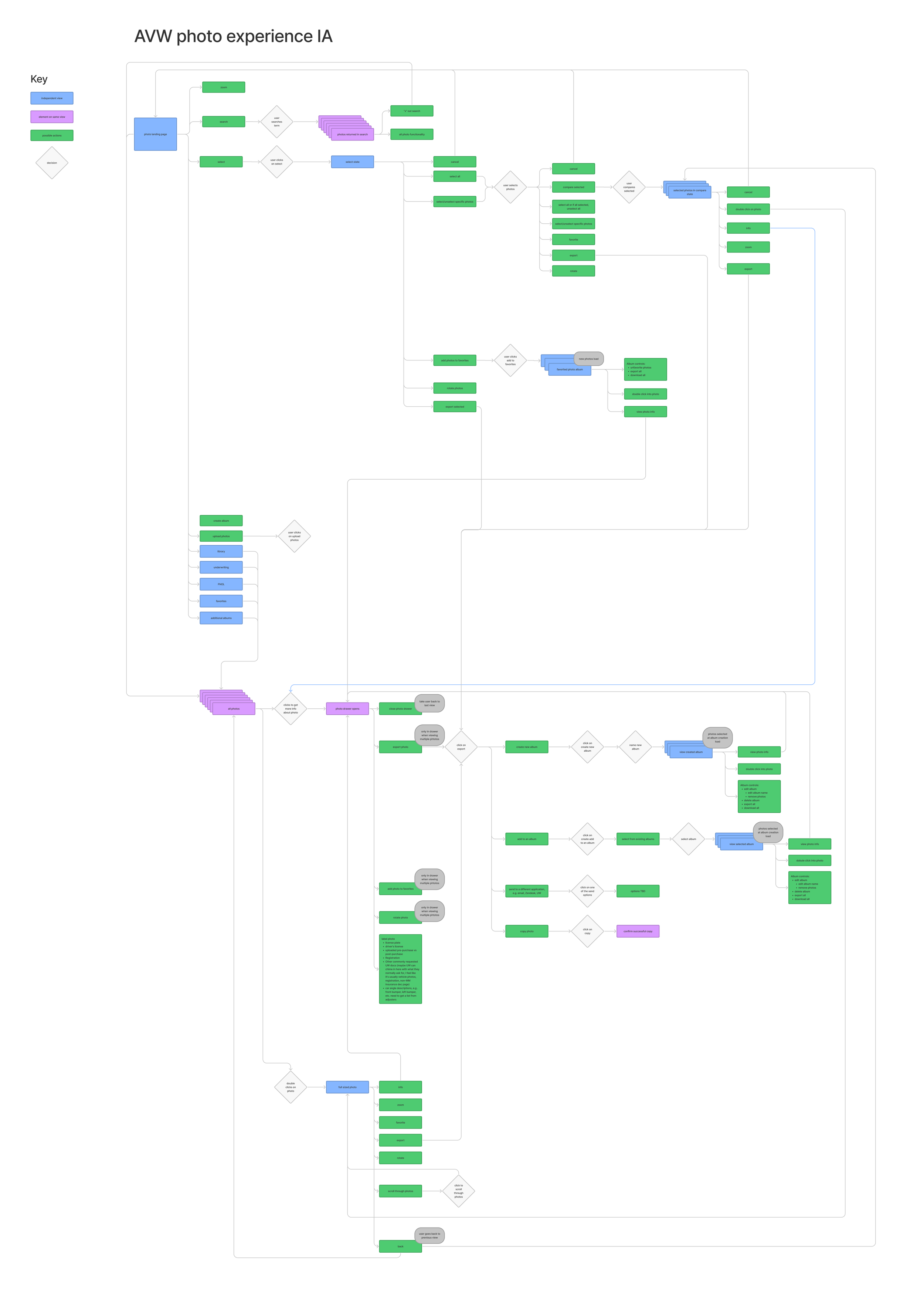
The information architecture for photos. Click here to see in detail.
Once I had a vision for the shape of the feature, but before getting too deep into solutioning, I created an IA flow chart to align with engineering. I wanted to make sure the information structure and proposed features were in scope. Additionally, backend was ready to start working on the project, and this framework would enable them to begin building out the skeleton of the functionality.
I worked with backend devs to talk through the requirement for the feature. This process greatly helped with alignment as the devs were thinking about how to build the new backend, e.g. photos should now be mapped to a vehicle on an account, not just an accident. It also helped us understand where the design required additional backend work. We were able to determine whether the increase in functionality was worth the increase in scope, e.g. creating the concept of an album, saving comments, labels, and direction of photos (after rotation), and allowing users to upload photos required photos were stored within the AVW backend. Previously, AVW served as a photo viewer but did not actually store the photos.
We decided that v1 wouldn’t include these more robust features, but once the backend was ready, v2 would incorporate features requiring photo storage. Because frontend had their plates full with other work and there wasn’t immediate time pressure on the design, I decided to move forward with the v2 design vision.
Wireframes and prototyping
Using my sketches and the IA, I created the first iteration of the design. Because we knew our work would be restyled once the Lemonade acquisition was complete, we decided to use a pre-existing design system called Chakra. It made life for the frontend engineers much easier by taking away the work of rebuilding components. It also reduced work on the design side; if we were going to use Metromile styles, I would have wanted to update what we already had. I was able to find a Figma community file with all of the components from the Chakra design system!
These designs aimed to:
Effectively navigate the photos so they can easily examine and compare the damage, including photo rotation, zoom, and dynamic side-by-side photo comparison.
See photo details that will help them determine fraud, including persisting metadata, namely GPS
Assist in remembering and communicating important information, including labeling and commenting on photos.
Ensure all relevant photos are stored in the same easy-to-access location by auto-adding photos related to the account or allowing adjusters to manually add photos directly.
Usability testing
After creating a prototype, I tested the designs with the 5 adjusters participating in the adjuster working group. I wanted to understand:
How does the design work or not work for the adjusters’ workflows? Do adjusters understand how to use the functionality in the new tool, e.g. view photo details, make albums, leave comments, label photos? Does the tool make it easy to do their most primary tasks?
How would the design work for adjuster handoffs, e.g. between case owners and SIU? Is the information case owners leave in the photos experience helpful when SIU (or other functions) pick up the same case? Is there enough context? Is the context provided helpful?
Are there interactions that aren’t intuitive and need reworking?
Getting the lowdown on annotation functionality from Brad
In the process of my interviews, I also got assets from adjusters showing how they’re using third-party tools to complete their work. Here’s an example how our adjusters used PowerPoint to compare photos for investigation review.
I learned that there was a lot of good in the current design, a lot of little things that needed changing, but one insight blew the others out of the water: when adjusters look at photos, the source of the photos is the critical piece of information. It tells the adjuster how they should use the photo in their interpretation: did the photo happen before the accident, is a photo recording the damage from the accident under investigation or a previous one, etc.? Especially when it came to the All photos view and the comparison functionality, I hadn’t made that information easily accessible. This insight led me to rework the designs, putting photo sources at the center of the experience.
As with all research, I also got ideas for the future, e.g. could we allow adjusters to export from the comparison view? If we allow adjusters to reply to one another, we also need a way to notify adjusters that they’ve been tagged.
Though I lead the sessions, Mike (the pm) and many of the engineers from the team sat in on the sessions. For those who didn’t, I shared out a summary of my findings in our squad’s slack channel and at one of our demo sessions.
Iteration
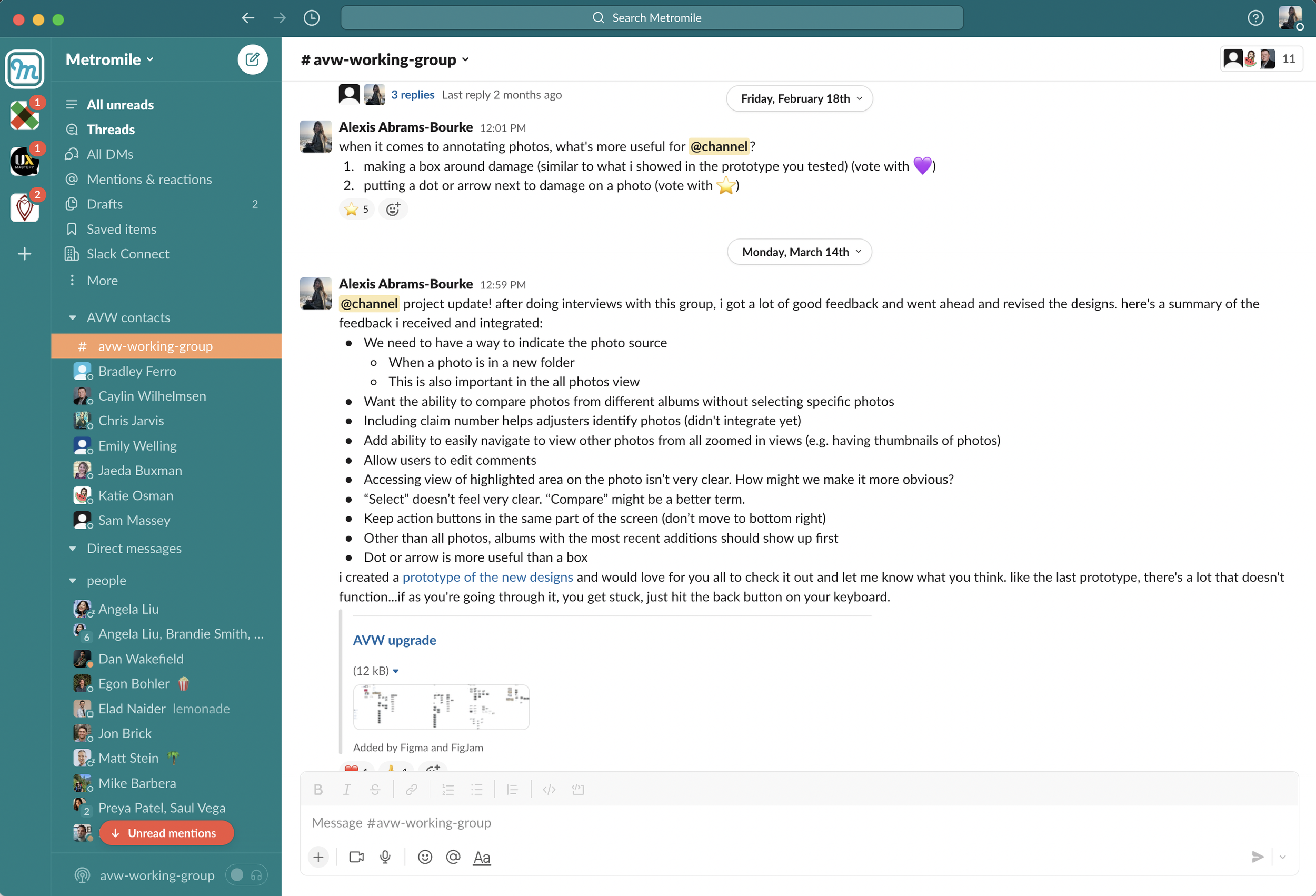
Based on learnings from the research, the next iteration had some major changes:
Put the photo source front and center (as discussed above).
In my previous design, I imagined adjusters would create an album of all the photos relevant to an accident. When they wanted to compare photos, they would be able to compare within that album. Though adjusters might create an album with the most important photos for their investigation, comparing photos is necessary to even understand which photos are most relevant to an investigation. It was really important that adjusters could compare photos from different albums.
Adjusters want to be able to easily navigate through photos when comparing them. In the original AVW, there were thumbnails. Adjusters wanted those back.
I kept my adjuster team in the loop by sharing the newest designs and prototypes in our slack channel.
Second round of user testing and iteration
Now I was in more of a refinement phase. I didn’t feel like I needed to usability test the designs with the entire team, but instead, I got feedback from two adjusters: one from SIU, because they use the tool the most intensely, and then a second who hadn’t seen the designs yet, so I could get a fresh perspective.
My main takeaway was around the utility of labels. The vision with labels was to have set values to allow easy photo organization, e.g. we could group all photos of the back bumper of a vehicle together. The thinking was that this would be useful for adjusters when they were investigating an impact on a certain part of a vehicle. After investigating more deeply, I learned two things that changed this strategy. Firstly, I had initially thought designating the photo tags would be a fairly easy task. Using photos from real claims, I would run a quick survey with adjusters to crowdsource the necessary tags. With the help of engineering, we could periodically add tags after launch. But after speaking with the SIU adjuster, I learned that there are enough esoteric photos to render a set number of tags constantly out of date. What adjusters really need is to title the photos, so they can recall their content. Secondly, it is unlikely that there would be more than 50 photos on a particular claim. Though automatic categorization would be nice, it wasn’t essential to the adjuster workflow.
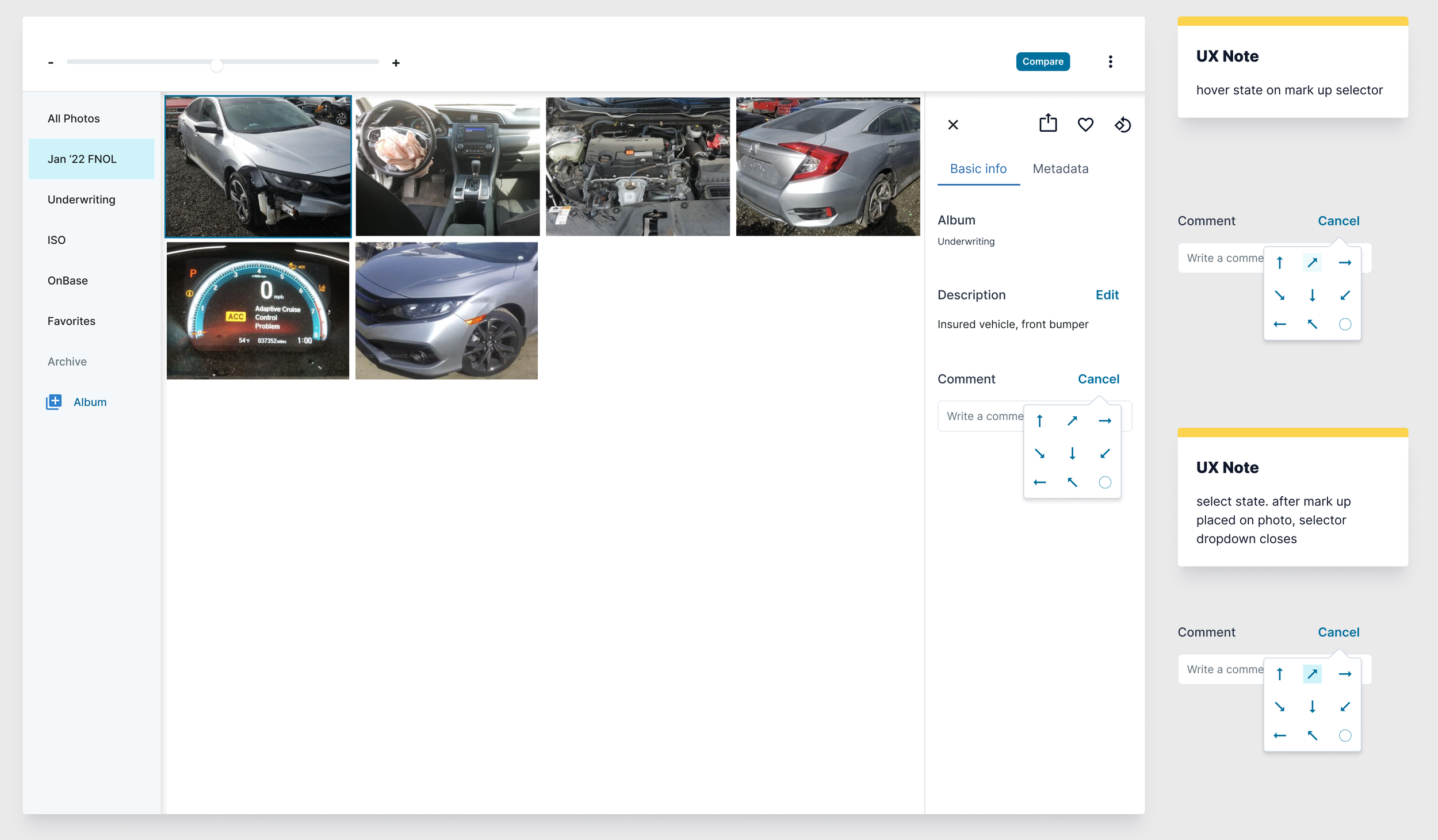
With that, I took a final pass at the designs. Show below is the photo info section, as that is where I made the most significant changes:
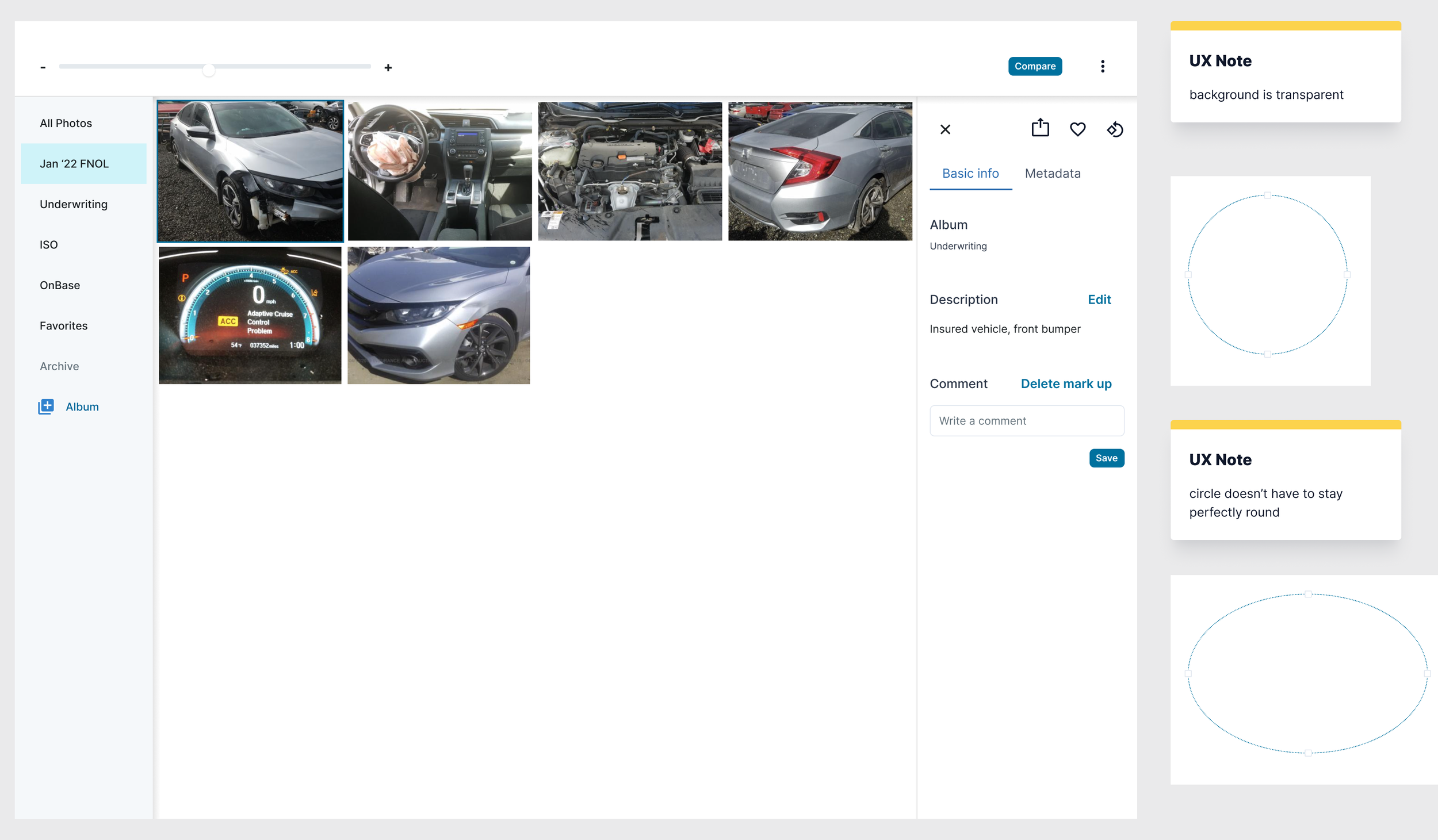
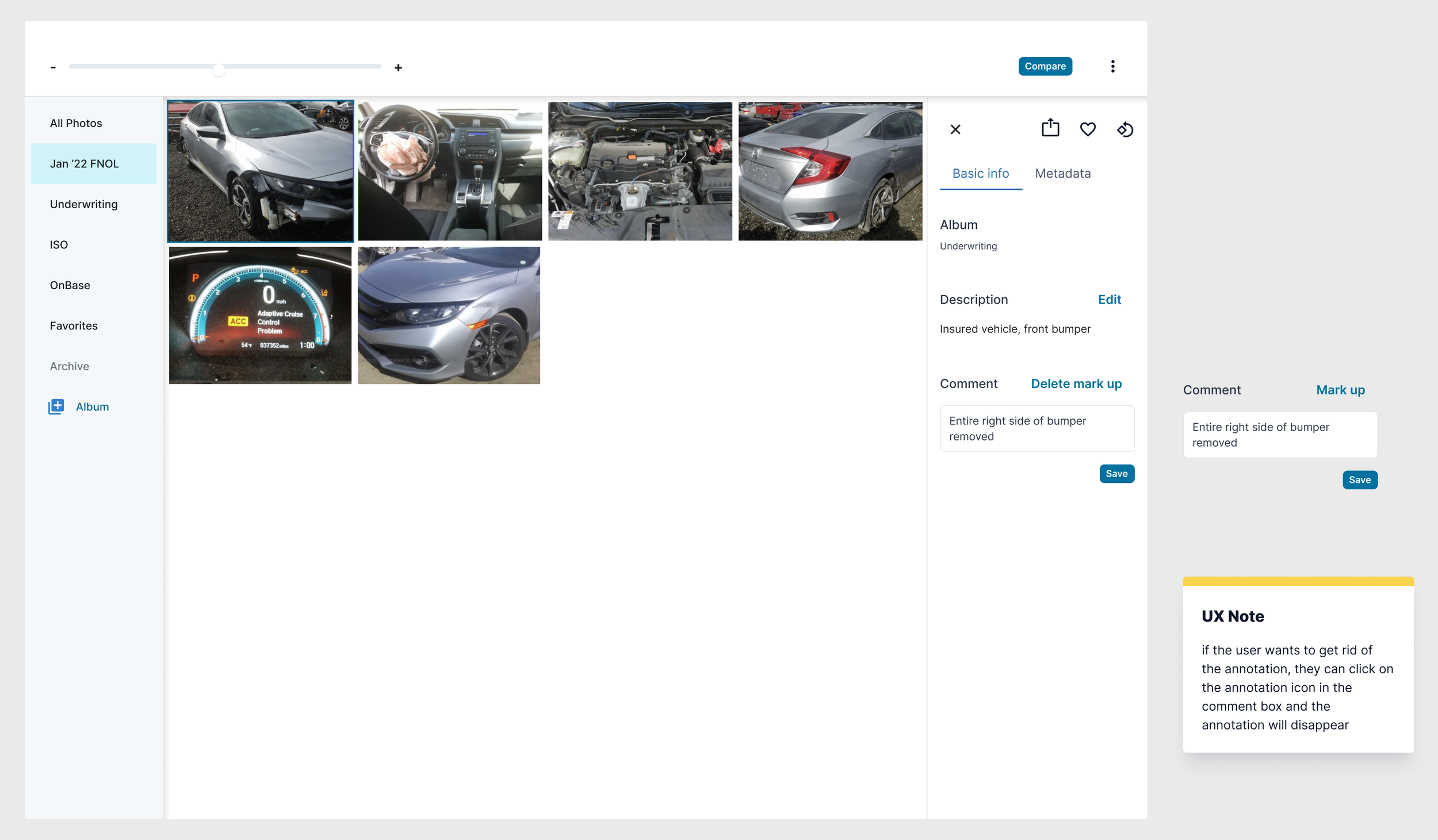
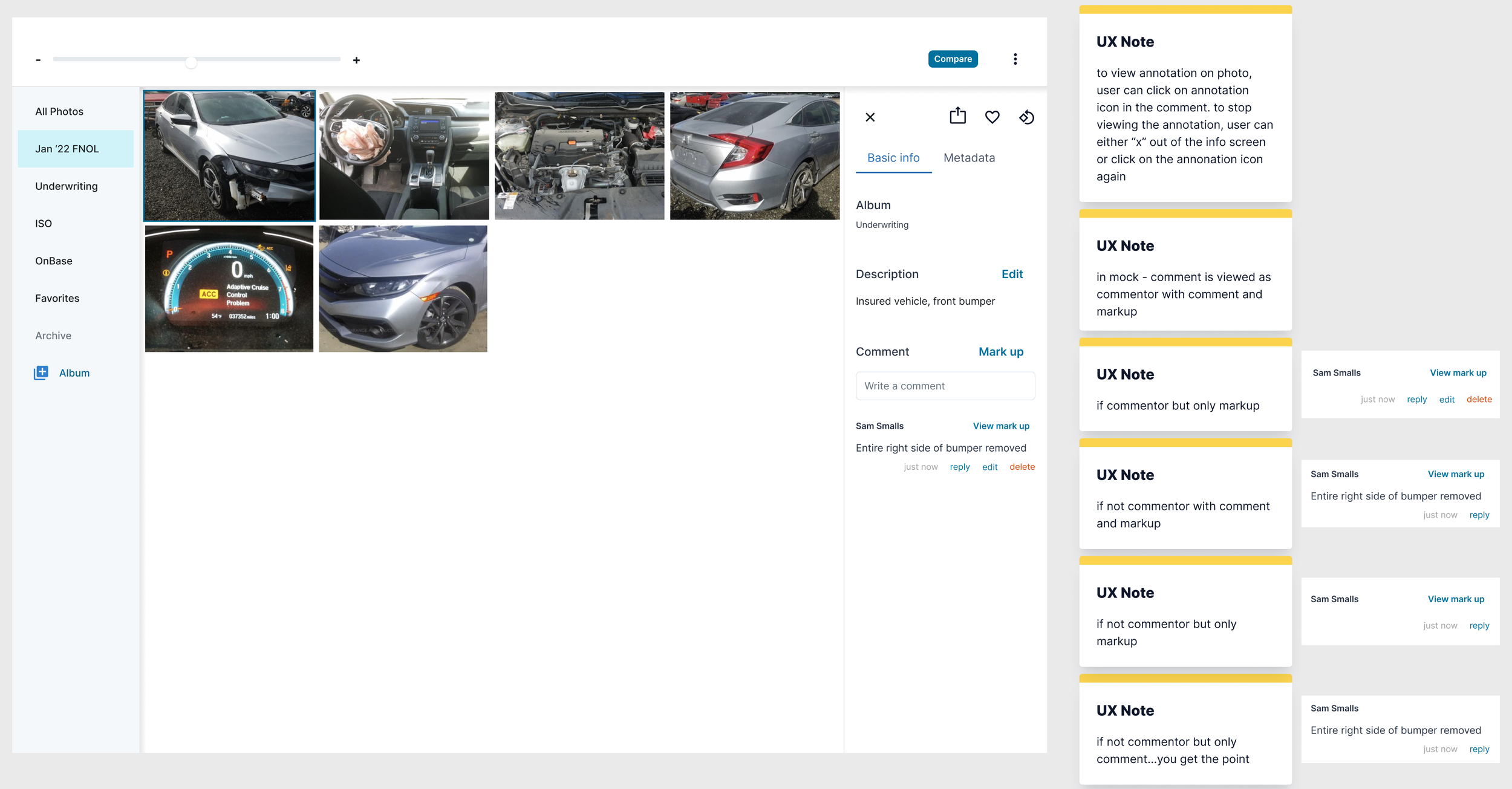
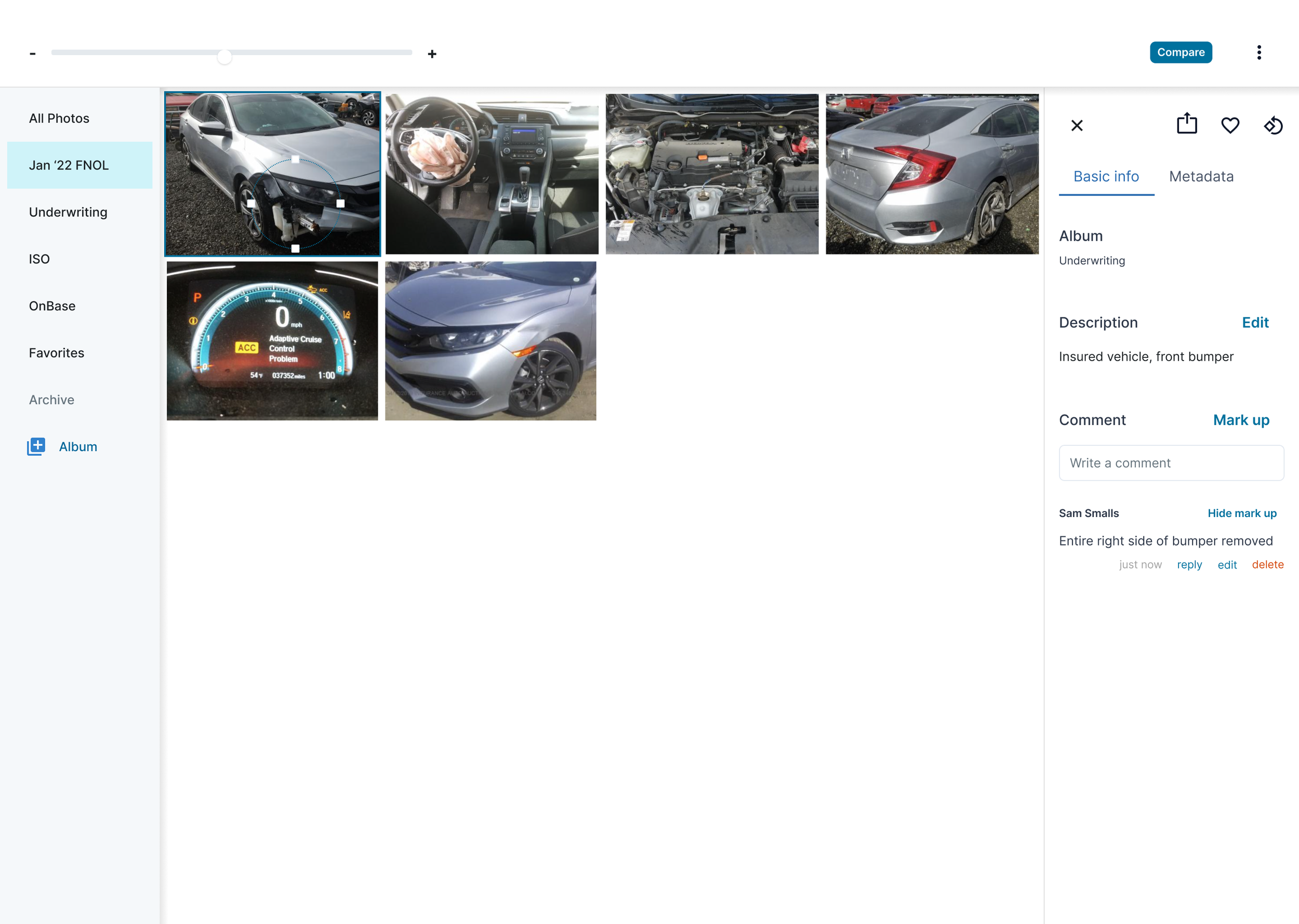
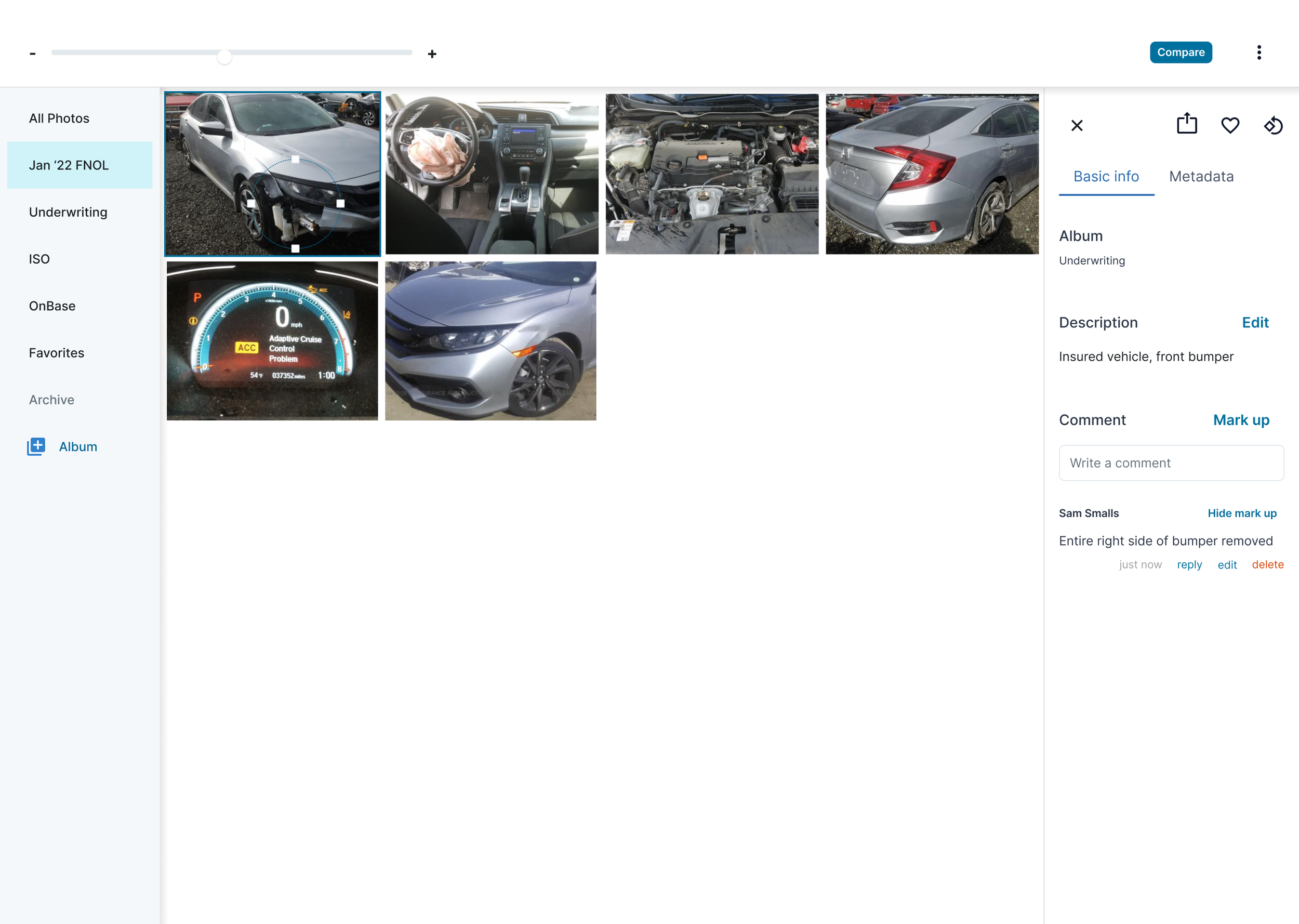
v1 release and dev collaboration
As dev, the pm, and I had decided, photos v1 wasn’t going to include photo storage. Because of this, I had to pair some of the functionality back and I reconceptualized the compare workflow to increase efficiency given these constraints.
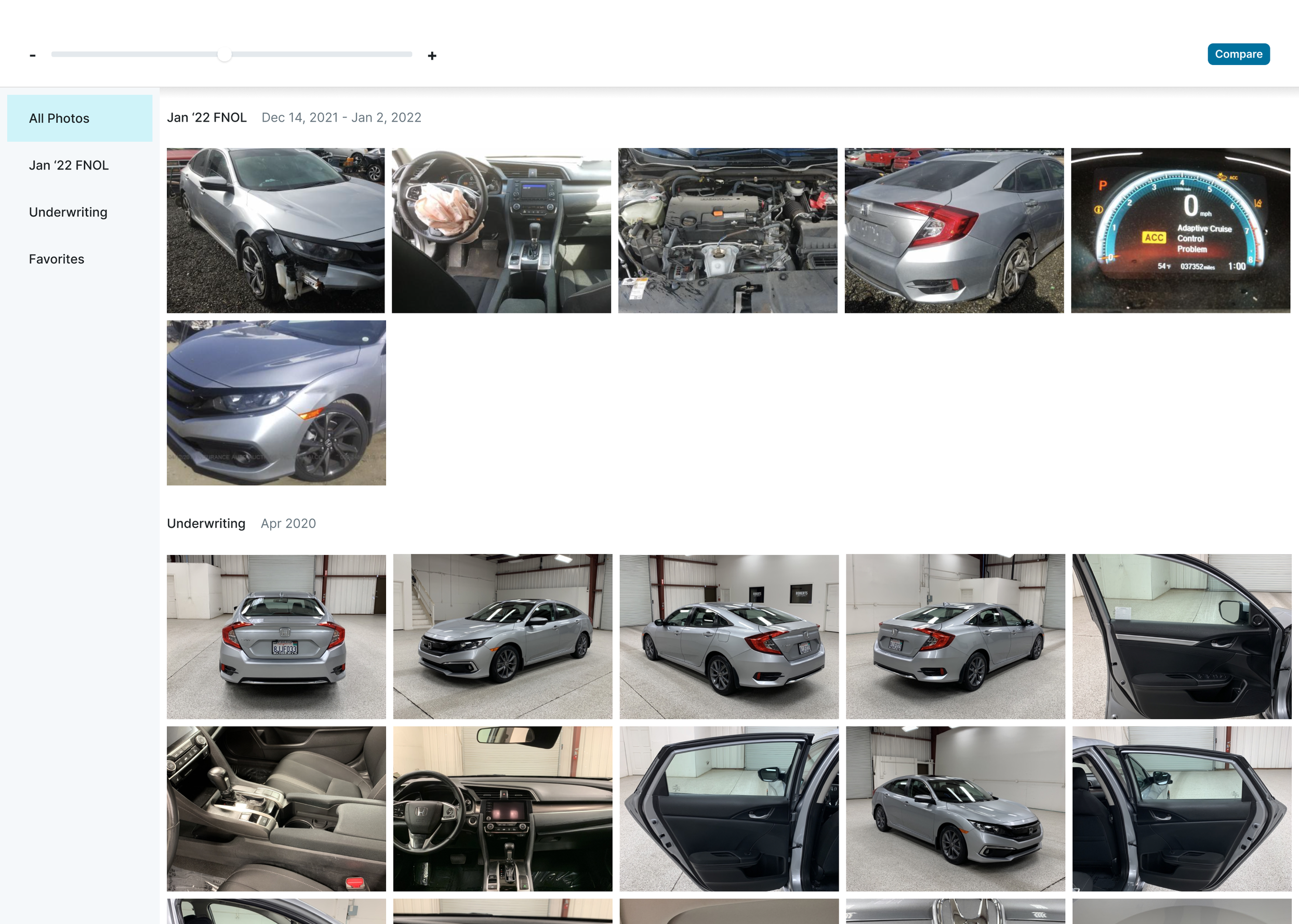
There are only two groups of photos (FNOL and underwriting) included in the MVP. I considered eliminating the sidebar nav altogether. Without many albums to look through, the sidebar takes up screen space without providing critical utility. But after discussing with dev, we decided keeping the sidebar in v1 would enable quicker iterations.

One of the largest changes to the workflow was the compare functionality. After clicking "compare" button, instead of selecting photos to compare, the two photo groups that are auto-loaded into the photos experience are automatically compared. Given only FNOL and underwriting photos are included in v1, comparing photos is one of the most common actions an adjuster would want to take and should be easy to access. I considered making the compare mode the default experience (similar to the current photos design,) but ultimately decided against it–most claims don't have underwriting photos associated with them, so in about 75% of cases this would just limit the screen real estate adjusters have to view photos.

Adjusters still have the option to change the photos they're comparing.
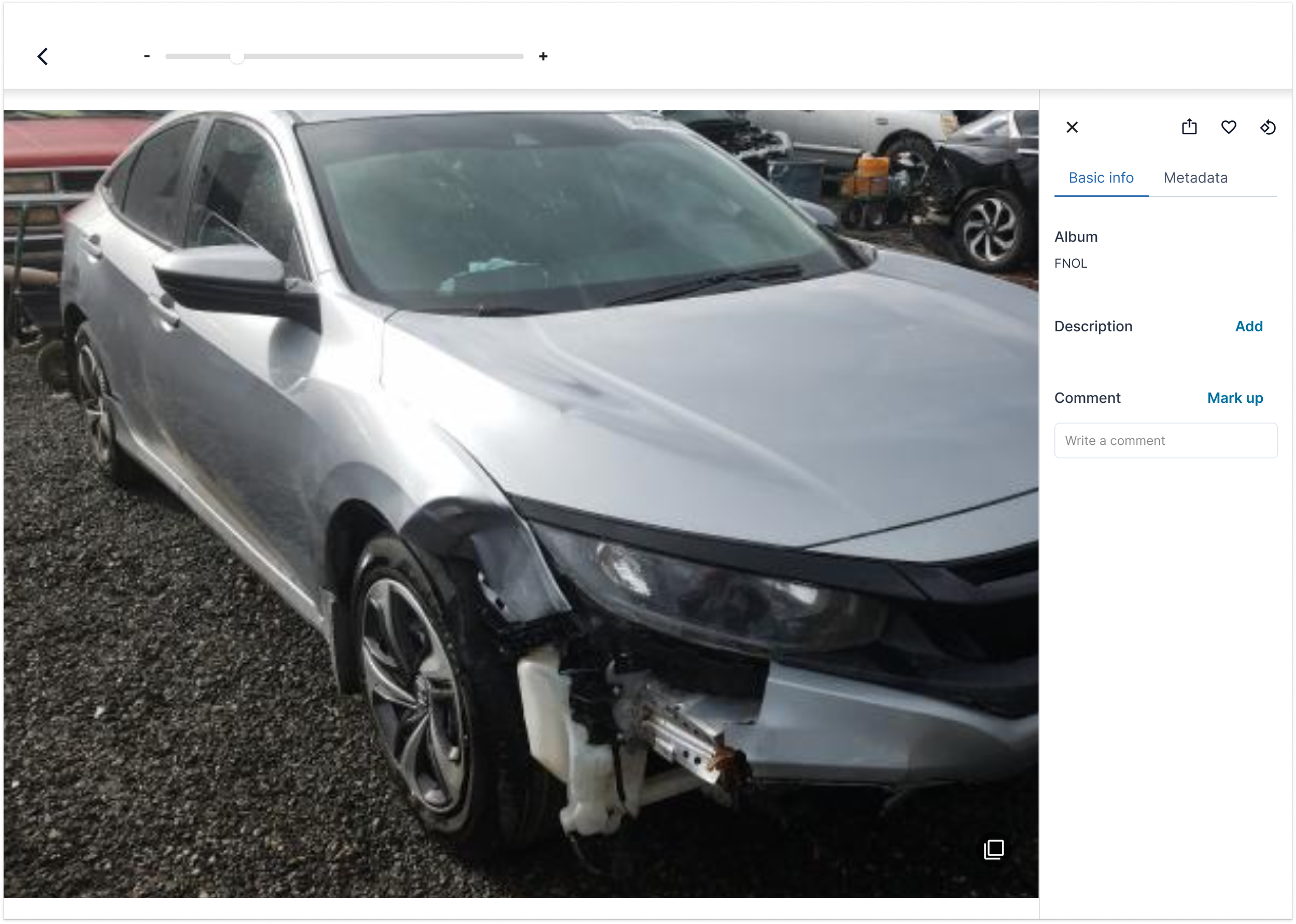
Because they didn't require as much backend work, we were able to include the description, comment, and mark up functionalities in the v1–a huge win for adjusters. Additionally, I decided to make photos full screen when adjusters clicked the info button. One of the drawbacks of user testing a prototype is that something that seems functional in the abstract might not actually be in practice. After reflection, I felt enabling mark ups on photo thumbnails would not be functional.

We wanted to build out as much of the frontend infrastructure as possible. For example, adjusters still have the ability to look through photo thumbnails for easy navigation. Building this functionality out now will mean faster iterations later and more wins for adjusters sooner.
Outcomes
Impact of the acquisition
Due to the Lemonade acquisition and resulting attrition, we had temporary engineering resourcing issues on the project, leading it to come to a near standstill for a couple of months. It’s up and running again, v1 was just released, and iterations are coming. I’m also in the process of adapting the designs for Blender, the Lemonade claims tool.
v1 results
Though I have yet to run a full user research study to get takeaways on the v1 designs, the feedback I’ve gotten from the AVW working group team has been resoundingly positive. Comments include:
Appreciation for the improved use of screen space given many claims don’t include Underwriting photos. One adjuster on the SIU team mentioned that it has helped him look at photos in more detail.
Access to photo metadata has already proven useful–an adjuster on the file owners team used metadata to identify fraudulent photos taken from the internet.
Though adjusters can’t export photos and data from the tool, according to a member of the SIU group, the new markup feature is shortening the time it takes to create incident reports. Instead of exporting the photo to Google Slides and adding arrows and circles there, he is able to do it in the photos experience, screenshot the photo with the markups, and then add the photo directly to the incident report.
Commenting is also keeping important details of the investigation top of mind.
As suspected, features not included in the v1 are still very much needed by the adjuster team. Though the biggest lift, adding photos directly to the tool would also be the biggest win for the team.
Metrics have also improved, though we only have one month of data so will need more time to see if the improvements are sustained:
The overall claim open to close ratio has improved from 1:.98 to 1:1.31.
The CQI has improved from .78 to .83.
We’re still waiting to get numbers back on the Loss Adjustment Expense combined ratio.
Reflections
How would I improve the process?
It was really fun to get to own this feature from end to end, but it was big enough that I think the designs could have used more iteration and testing, e.g. is a sidebar nav the best way for adjusters to navigate through their photos? I would have liked to try out different patterns in higher fidelity.
Additionally, one of the challenges of this project was that we didn’t have real-world data when trying to understand the number and types of photos adjusters were using in their investigations. The legacy AVW photos feature wasn’t pulling photo data comprehensively. As a result, I didn’t have as clear of an idea of what the photo results on a given vehicle’s account would look like. We had hypotheses, but no real photos to work with. Instead, we relied on annectdotal feedback.
What’s next?
Once our adjuster team has had a chance to use and reflect on the MVP release, I’ll do a round of research to get feedback on the designs and insight into necessary iterations. Our main goal with this feature is to increase adjuster satisfaction and efficacy. Because of the relatively small size of the adjuster team, we’re relying on anecdotal feedback to determine our success.
Additionally, not everything made it into the first iteration of the product. Perhaps most importantly, we weren’t able to automatically import photos from outside of Metromile. This is a large backend lift and we felt it was better to release the feature without this functionality. That said, adding photos from outside sources is a painful and tedious process. Automating this would be a huge win for our adjusters. Auto-generating reports would be another big win. This type of feature work will become a higher priority as the claims team handles more and more claims and it’s more urgent to save every minute possible in the adjuster workflow.